
You publish a page about your best product. Three months later, it still does not appear on Google. The problem rarely comes from the technical side. Most often, the keyword was poorly chosen, or the page does not answer what people are looking for. To rank a keyword, there is an order to follow, and we break it down here into 9 steps.
Take an online shop selling office furniture that wants to climb back up for “ergonomic chair”. We follow it throughout the article.
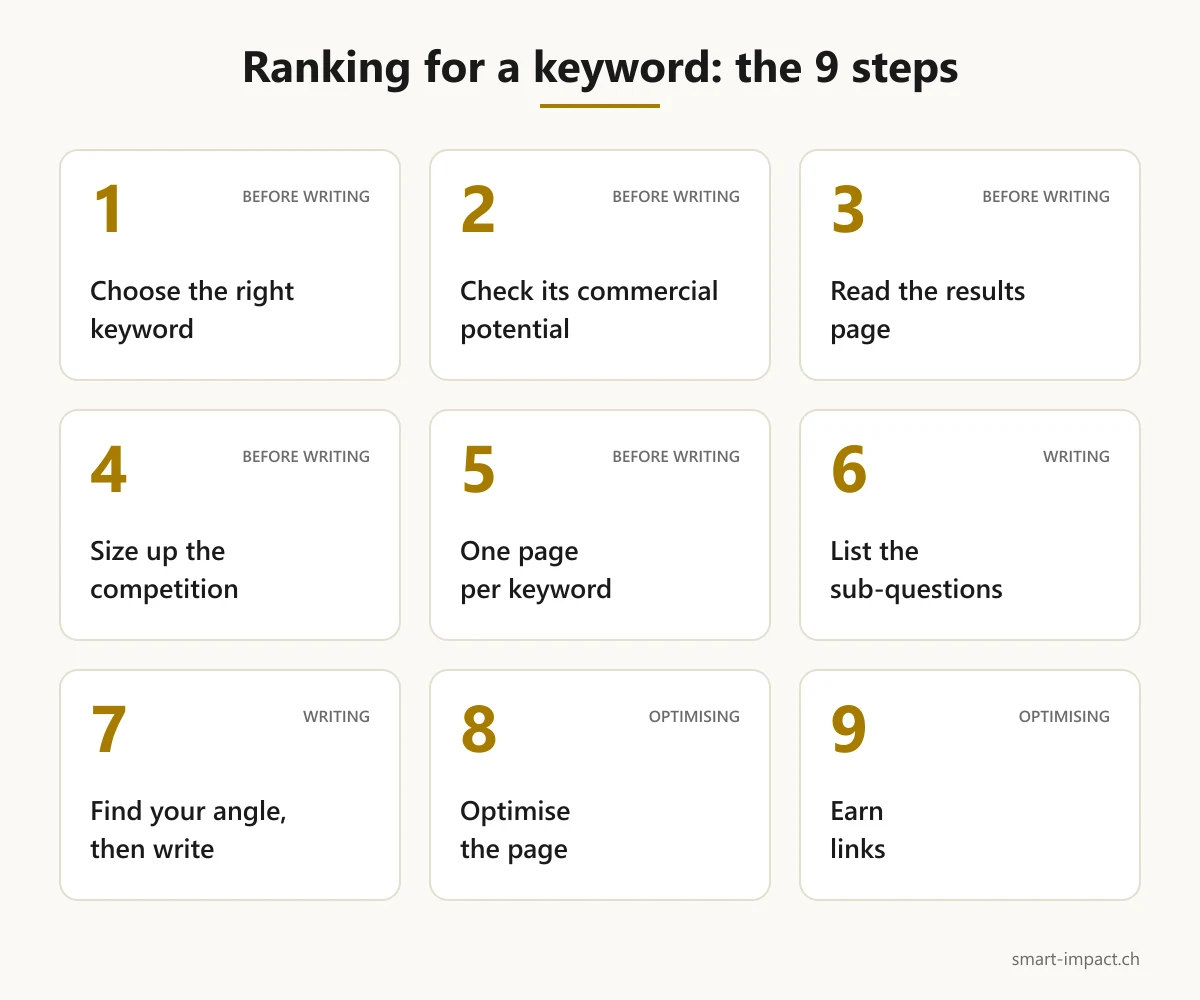
1. Choosing the right keyword
Start from what your customers actually type. Search Console already shows the queries your site appears for. Google Ads Keyword Planner estimates monthly search volume, provided you have a Google Ads account with billing details. The suggestions that appear when you type into Google are also a good source, and free. Paid tools such as Ahrefs go further and show the traffic the top-ranking page gets.
Aim for the topic rather than the exact wording. Google understands that a page about the ergonomic chair also answers “ergonomic office seat”, even if those words do not appear as such. A well-built page therefore ranks for a whole family of queries.
2. Checking its commercial potential
A heavily searched keyword brings you nothing if it never leads to what you sell. Ahrefs offers a simple grid, scored from 0 to 3, which we also use.
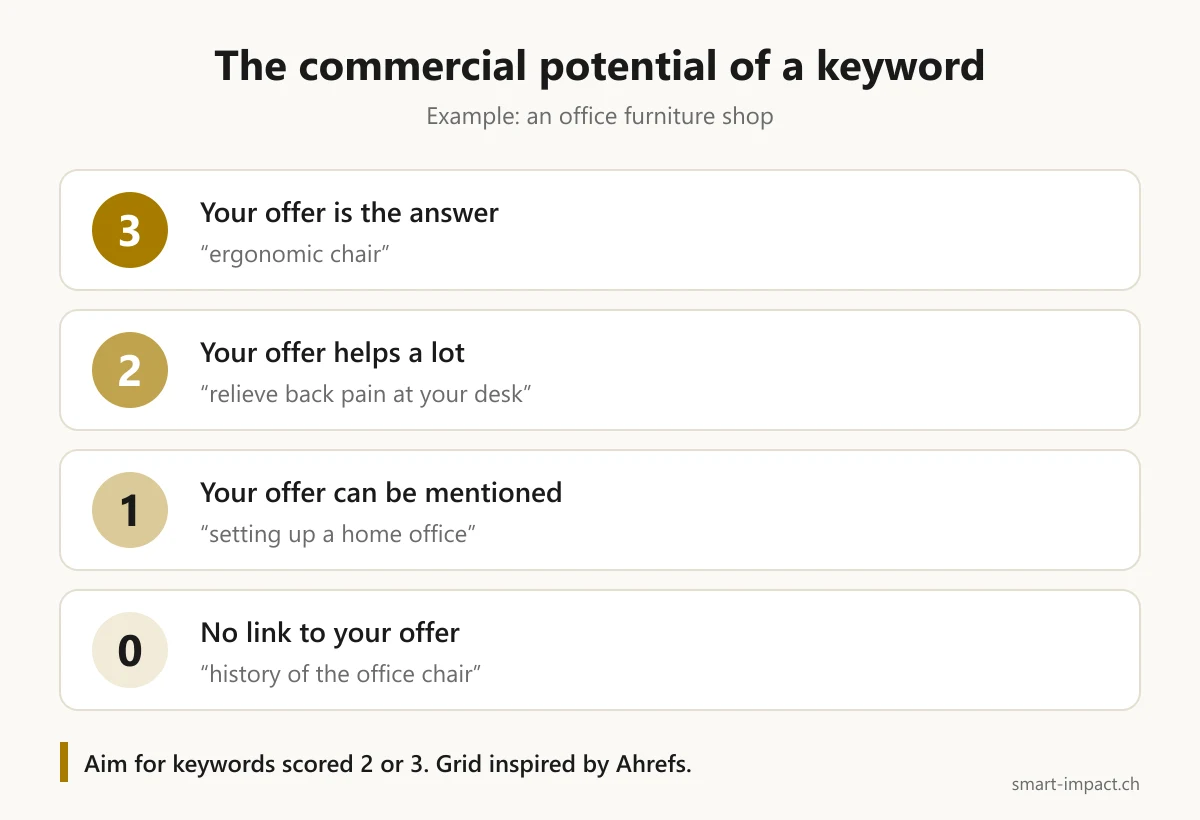
For our shop, “ergonomic chair” scores 3, because the product is the answer. “Relieve back pain at the desk” scores 2: the chair helps a lot, without being the only solution. “History of the office chair” scores 0. Save your energy for the keywords scored 2 or 3.
3. Reading the results page before writing
Type the keyword into Google and look at what comes up. The format of the top results shows what Google considers useful: buying guides, product pages, comparisons, a map with local businesses, or an AI-generated summary.
If the first page shows only buying guides, a product page will struggle to get in. Our shop must therefore check whether Google mostly shows shops or mostly advice for “ergonomic chair”, then produce the same type of page.
4. Measuring competition realistically
Look at who holds the first page. If it is large brands and long-established media, the spot will take a long time to win. An Ahrefs study shows that 72.9% of the pages in the top 10 are more than three years old, and that the page ranked first is on average five years old.
In that case, aim first for a more precise variant, such as “ergonomic chair for a small office”. These queries have less volume, but also fewer competitors and a clearer intent. We explain this logic in our article on long-tail keywords.
5. Assigning a single page to the keyword
Before writing, check that no page on your site already targets this keyword. When two pages compete for the same query, Google hesitates between them and neither stands out. This is called cannibalisation.
If a page already exists, improve it instead of creating a new one. It has a history, and sometimes links already.
6. Listing the sub-questions to cover
Someone searching for “ergonomic chair” also wants to know which settings to check, how much to budget, or whether it really relieves back pain. To find these questions, look at Google's “People also ask” section and the subheadings of pages that already rank well.
In its guidelines, Google asks whether the content gives “a substantial, complete or comprehensive description of the topic”. So cover the important sub-questions. Padding to reach a word count adds nothing.
7. Finding your angle, then writing
If your page says the same thing as the ten others, Google has no reason to rank it ahead. You need something the others do not have: your own data, your hands-on experience, or work your competitors cannot be bothered to do.
Our shop could, for example, indicate the settings its customers ask about most, or compare its models on the same criteria, backed by photos. This is the kind of original information, drawn from first-hand experience, that Google says it looks for.
As for the writing itself, get into the subject from the first sentence and lean on examples. A reader who quickly finds their answer stays on the page.
8. Optimising the page
Place the keyword where Google and internet users read first: the title tag, the H1, the URL, the opening lines, at least one subheading and an image's alt text. Also write a meta description that makes people want to click.
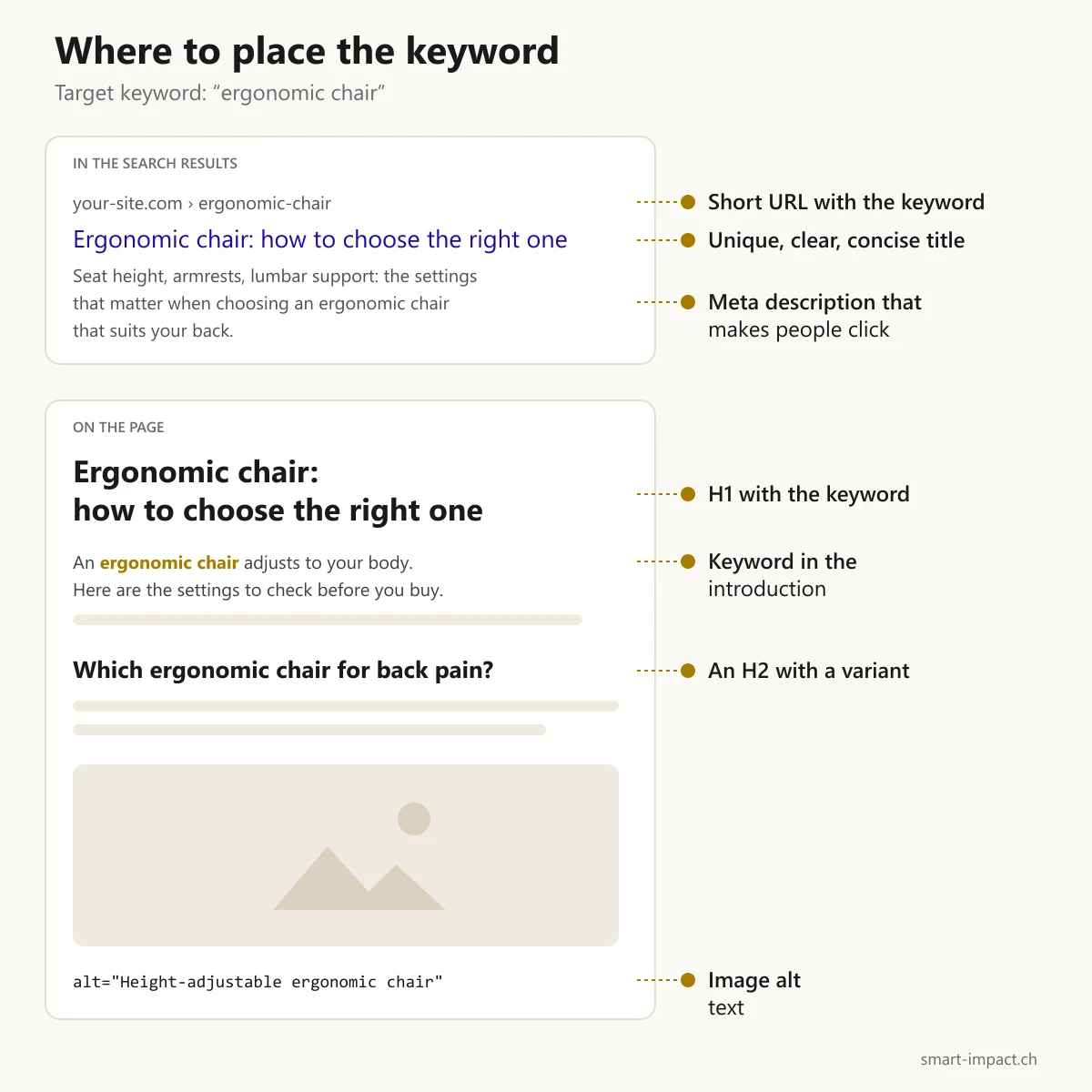
No need to repeat it everywhere. Google ignores the meta keywords tag, and its anti-spam rules specifically target keyword stuffing. For the title tag, Google asks for unique, clear and concise text, without repeating the same words several times.
Finally, check that Google can index the page and that it loads quickly on mobile. The URL Inspection tool in Search Console tells you whether Google knows the page and can display it.
9. Pointing links to the page
Start with your own pages. Add links from related content, with link text that describes the destination, for example “how to choose an ergonomic chair” rather than “click here”.
Links from other sites count too, especially on competitive queries. They are rarely obtained by asking for them. A page that offers original data or a serious comparison simply has a better chance of being cited by other sites.
What about AI engines?
AI-generated summaries take a share of the clicks. According to Advanced Web Ranking, when an AI summary appears, the click-through rate of the first result drops by about half.
To appear there, the method stays the same. Google states it plainly: there is no additional requirement or special optimisation to appear in AI Overviews or AI Mode, and no particular file to create. The 9 steps therefore apply to the summaries as well.
Next: monitor and adjust
Once the page is published, track it in the Search Console performance report. It gives four figures: clicks, impressions, click-through rate and average position.
According to a Backlinko analysis of nearly 4 million results, the first result gets 27.6% of clicks on average, and the top three capture 54.4%. Gaining one or two places therefore makes a big difference.
If impressions rise but clicks do not follow, rework the title tag and the meta description. If the page stalls beyond the second page, go back to steps 6 to 9: it is often missing a sub-question, a distinct angle or links.
Frequently asked questions
How long does it take to rank first on Google?
Nobody can guarantee it. The Ahrefs study gives an idea: in a sample of recent pages, around 6% reach the top 10 in under a year. Of those that get there, nearly 41% do so within the first month.
Can you target several keywords on the same page?
Yes, if they answer the same intent. “Ergonomic chair” and “ergonomic office seat” go on the same page. “Ergonomic chair” and “standing desk” deserve two separate pages.
Should you repeat the keyword often?
No. Place it in the key spots and write the rest naturally. Forced repetition amounts to keyword stuffing, which Google classes among spam practices.
Where to start when optimising for a keyword
Take a page that matters for your revenue and run it through the 9 steps. The blockage is often right at the start, in the choice of keyword.
If you want an outside view, that is what we look at during the first conversation, before discussing SEO support.
Sources
- Ahrefs: How to Rank for a Keyword (8 Steps)
- Ahrefs: How Long Does It Take to Rank in Google?
- Google Search Central: SEO starter guide
- Google Search Central: spam policies
- Google Search Central: creating helpful, reliable content
- Google Search Central: influencing titles in search results
- Google Search Central: AI features and your website
- Search Console Help: Performance report
- Google Ads Help: Keyword Planner
- Backlinko: Google organic CTR stats
- Advanced Web Ranking: Google organic CTR