A research-based guide to turning your CRM investment into lasting success
By: Mehdi B., digital transformation expert Published on: 24 November 2025 Reading time: 38 minutes Last updated: 24 November 2025
Table of contents
- The alarming reality of CRM failures
- The 7 proven strategies
- A 12-step action plan
- Conclusion
The alarming reality of CRM failures
The statistics on CRM project failure are as consistent as they are alarming. For more than two decades, analysts have been sounding the same alarm:
Between 47% and 55% of CRM projects fail to reach their initial objectives, according to research by Gartner, Forrester Research and Johnny Grow. To put those figures in perspective: one CRM project in two is heading for failure, despite investments that are often colossal in time, money and human energy.
More worrying still, a recent study by the Merkle Group reveals that 63% of CRM initiatives never reach their full potential, leaving companies with a disappointing, even negative, return on investment.
And the problem is not limited to outright failure. According to CSO Insights, fewer than 40% of companies achieve full adoption by their end users. Even in organisations where the CRM is technically “in place”, most users only tap a fraction of what it offers.
Why is this guide different?
In the lines that follow, you will discover 7 strategies proven by academic research and validated in the field for securing the adoption of your CRM. These strategies draw on:
- More than 25 years of research carried out by Prosci on organisational change management
- Studies covering thousands of companies and analysing the patterns of success and failure
- Tested methodologies such as the ADKAR model, used by Fortune 500 organisations
- Recent data (2023-2025) that reflects today's realities
Ready to turn your CRM project from a statistical risk into a secured success?
Strategy #1: start with user-centred design thinking
Founding principle: a CRM is not adopted because it is technically sophisticated, but because it solves real problems experienced by the end users.
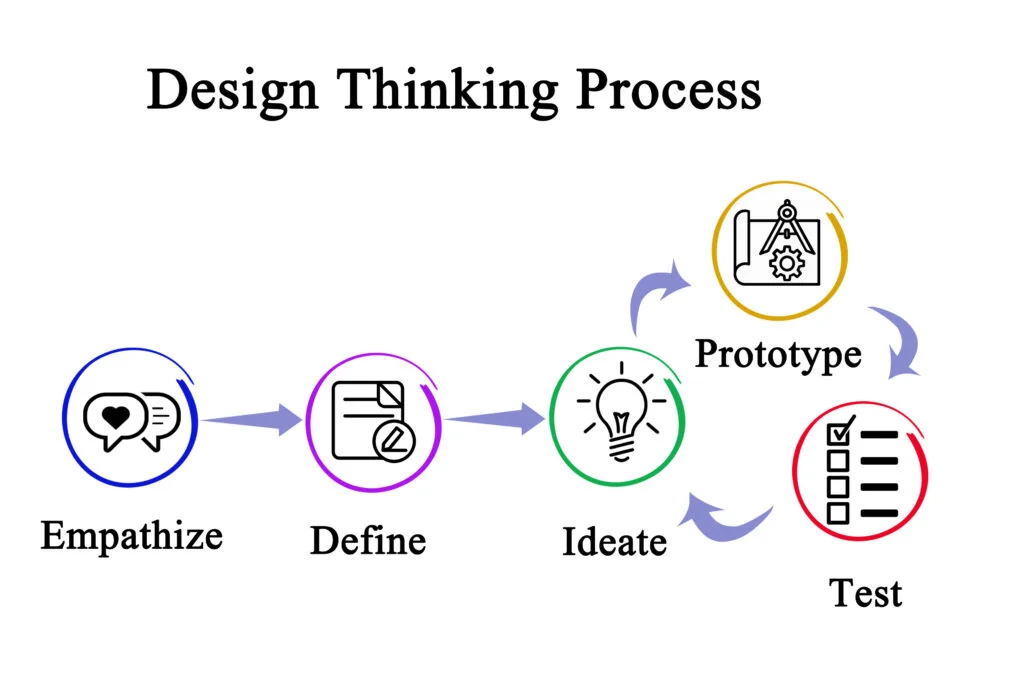
Design Thinking is an approach that puts the user at the centre of the design process. Instead of choosing a CRM and then trying to get that choice adopted, you start by understanding the real needs, the daily frustrations, the natural workflows… then you choose and configure accordingly.
Step 1: build a representative team (week 1)
Do not settle for management and IT alone. Include:
- 2-3 field sales reps (not only top performers, average profiles too)
- 1-2 people from customer support
- 1 middle manager
- 1 marketing representative if the CRM concerns them
- 1 sales assistant entering data daily
That diversity ensures you understand the whole value chain.
Step 2: run discovery workshops (weeks 2-3)
Organise 3-4 sessions of 2-3 hours with this extended team:
🎯 Workshop #1: Mapping current frustrations:
- Ask everyone to write on sticky notes their 3 biggest daily frustrations around managing clients
- Group by theme (e.g. “information loss”, “double entry”, “hard to search”)
- Prioritise collectively: which frustrations cost the most (time, money, customers)?
🎯 Workshop #2: User journey mapping:
- For each key role, map a typical day or a typical process
- At each step, identify: actions, tools used, information needed, friction points
- See where information gets lost, where handoffs fail, where time is wasted
🎯 Workshop #3: Solution ideation:
- With no technical constraints, ask: “if you had a magic wand, how would you solve these problems?”
- Encourage wild ideas, then refine towards the realistic
- Create detailed personas (junior salesperson, senior salesperson, manager, support)
🎯 Workshop #4: Prioritising needs:
- List all the features you want
- Sort them into: Must-have (critical), Should-have (important), Nice-to-have (bonus)
- Estimate the business impact of each one
Step 3: field observation (week 4)
Shadowing (observation) reveals what workshops do not show:
- Spend half a day with 3-4 different users
- Watch them work without stepping in
- Note down the workarounds they have created (often brilliant!)
- Identify the micro-frictions that are invisible but time-consuming
Step 4: synthesis and user requirements specification (week 5)
Compile it all into a structured document:
- The 10 critical problems to solve
- The 5 key processes to support
- The 3 main personas and their specific needs
- The prioritised list of features (Must/Should/Nice)
This document becomes your compass for selecting and configuring the CRM.
Step 5: iterative validation (throughout the project)
Once the CRM is selected and configured:
- Run user testing sessions (give them tasks, observe)
- Collect feedback: what is intuitive? what gets in the way?
- Adjust before the wide rollout
- Create a group of pilot users who test in real conditions
Success metrics
✓ Participation rate: 80%+ of end users involved in at least one workshop or interview ✓ Representativeness rate: The personas defined cover 90%+ of real users ✓ Design satisfaction score: Pilot testers rate usability 4/5 or higher ✓ Number of suggestions incorporated: At least 60% of “must-have” needs are implemented
Pitfalls to avoid
❌ Fake Design Thinking: Pretending to consult when the decision has already been made. Users sense it and disengage. ❌ Consulting too broadly: Trying to satisfy 100% of the requests of 100% of people. Impossible. Focus on the 80/20. ❌ Analysis paralysis: Spending 6 months in workshops without ever moving forward. Design Thinking has to be fast and iterative. ❌ Ignoring constraints: Designing an ideal system that is impossible to implement with your budget, time or technology.
A concrete example
A 120-person B2B services company discovers through design thinking that:
- Sales reps lose 4 hours a week digging through their emails for customer history
- 30% of important information sits in personal paper notebooks
- Handoffs between sales and support fail one time in three
So they prioritised in their CRM:
- Ultra-fast mobile interface for on-site data entry
- Automatic two-way email integration
- Handoff workflow with a mandatory checklist
Result: 92% adoption in 3 months.
TO READ: Leader’s guide: 3 steps to turn technology fear into mass adoption
Strategy #2: demonstrate individual value (WIIFM)
Founding principle: people do not adopt what is good for the company, they adopt what improves their daily life.
The WIIFM principle (What’s In It For Me) consists of identifying and communicating the direct personal benefits for each role. Not the abstract benefits for “the organisation”, but the concrete gains in each person’s daily work.
Step 1: identify the gains by persona (weeks 1-2)
For each persona identified in your Design Thinking, document:
🎯 Current pain points:
- What takes them too much time?
- What frustrates them day to day?
- What stops them from reaching their goals?
- What stresses them?
🎯 The direct benefits of the CRM:
- How does the CRM solve each pain point?
- How much time saved? (quantify it!)
- Which frustration is removed?
- What objective is made easier?
Example for the “Senior field salesperson” persona:
| Current pain point | CRM benefit | Quantification |
|---|---|---|
| Spends 5h a week on manual reports | Reports generated automatically | Gain: 5h/week |
| Forgets 20% of important follow-ups | Automatic alerts before the deadline | +15% conversion rate |
| Loses time tracking down the client history | All the information in one click | Meeting preparation: 30 min → 5 min |
| Feels constant reporting pressure | Visibility given without an active request | Less stress |
Step 2: build individual ROI calculators (week 3)
Build a simple tool (a spreadsheet or a web page) that lets each user calculate THEIR own gain:
How much time do you spend each week on:
- Looking for client information? [__] hours
- Producing manual reports? [__] hours
- Following up with prospects manually? [__] hours
- Re-explaining the context to your colleagues? [__] hours
TOTAL: [__] hours
With the CRM, you could gain: [] hours per week That is [] hours per year That is [__] full days per year
What would you do with [__] extra days?
This calculator makes the benefit tangible and personal.
Step 3: develop a personalised communication campaign (weeks 4-6)
Create different communication materials for each persona:
🎯 For sales teams:
- Testimonial video from a salesperson showing concretely how they use the CRM to prepare their meetings in 5 minutes
- One-pager: “5 ways the CRM supports your sales”
- Quick win: “Automate your weekly reports in 3 clicks”
🎯 For managers:
- Demo dashboard with realistic data showing real-time visibility
- Case study: “How manager X increased their team’s performance by 23%”
- One-pager: “Make better decisions with reliable data”
🎯 For customer support:
- Before/after scenario: a customer who calls back 3 times vs resolution in 1 call
- Testimonial: “How I improved my customer satisfaction rate”
- Quick win: “Resolve 30% more tickets per day”
Step 4: run interactive demos by role (weeks 7-8)
Instead of generic training, offer “success previews”:
- 45-minute sessions per role group
- Show live how to carry out their day-to-day tasks
- Use THEIR data (anonymised) so that it is concrete
- Finish with “Imagine doing that 10 times a day: how much would you earn?”
Step 5: create a champions programme (ongoing)
Identify and develop your champions:
- Select 5-10% of enthusiastic early adopters
- Train them in depth (internal certification)
- Give them visible status (badge, honorary title)
- Ask them to share their experience regularly
- Create a monthly “success story” featuring a champion
Success metrics
✓ WIIFM score: 75%+ of users can explain 2-3 personal benefits they will gain ✓ Pre-launch engagement: 60%+ of users have used the ROI calculator or attended a demo ✓ Positive sentiment: In pre-launch surveys, 70%+ are “enthusiastic” or “curious” (vs “resigned” or “opposed”) ✓ Active champions: 8-12% of users spontaneously position themselves as ambassadors
Pitfalls to avoid
❌ Macro-level benefits only: “The company will perform better” motivates nobody individually. ❌ Unrealistic overselling: Promising impossible gains creates disappointment after launch. ❌ The one-size-fits-all approach: Communicating the same benefits to every role. Personalise! ❌ Forgetting middle management: Middle managers are key influencers, and are often overlooked.
A concrete example
A distribution company discovers that:
- Sales reps are sceptical: “another surveillance tool”
- They spend 2 hours a day looking for scattered information
The WIIFM strategy deployed:
- Calculator showing: “10h/week saved = 1 extra client appointment per day”
- Video testimonial from the top performer: “Thanks to the CRM, I increased my sales by 18%”
- Personalised demo: “Here is how to prepare tomorrow’s meeting in 3 minutes”
Result: the initial scepticism (75% “not convinced”) turns into enthusiasm (82% “can’t wait to try it”).
Strategy #3: simplify radically (less is more)
Founding principle: complexity is the mortal enemy of adoption. Every superfluous click, every useless field, every confusing menu is an invitation to give up.
The “Less is More” principle consists of ruthlessly stripping down your CRM to keep only the essentials. Not what is possible, not what might be “useful one day”, only what is critical today.
Step 1: apply the 80/20 rule (weeks 1-2)
Identify the 20% of features that generate 80% of the value:
🎯 Audit the real needs:
- List ALL the features available in your CRM
- For each one, ask: “How many users will use it daily?”
- Categorise: Critical / Important / Useful / Nice-to-have / Superfluous
🎯 Be ruthless:
- “Critical” features only for the initial rollout
- The “Important” ones added after 3 months of use
- The rest: perhaps never
Example of sorting:
| Feature | Category | Decision |
|---|---|---|
| Create a contact | Critical | ✅ Phase 1 |
| Save activity | Critical | ✅ Phase 1 |
| Visual pipeline view | Critical | ✅ Phase 1 |
| Dashboards | Important | ⏸️ Phase 2 (month 3) |
| AI forecasts | Useful | ⏸️ Phase 3 (month 6) |
| Gamification | Nice-to-have | ❌ Not planned |
| Social network integration | Superfluous | ❌ Disabled |
Step 2: simplify forms and workflows (weeks 3-4)
Every input field is an obstacle:
🎯 Reduce mandatory fields:
- Golden rule: a maximum of 3-5 mandatory fields for a routine action
- Example of contact creation: Name, Email, Company. That is all.
- Everything else is optional or automated
🎯 Automate intelligently:
- Automatic geolocation of the business
- Automatic sector detection (via company name)
- Pre-filling based on the email address (@company.com → Company)
- Smart suggestions based on history
🎯 Progressive disclosure (revealing information step by step):
- Show only the essential fields by default
- Advanced fields are hidden under “Show more” or “Advanced options”
- The user chooses their level of detail according to need
Before/after example:
❌ BEFORE (complex form):
Create a contact:
- Title * [Mr/Mrs/Dr/…]
- First name - Last name
- Function - Email
- Landline
- Mobile - Company
- Business website
- Industry - Company size
- Company revenue
- Address line 1 *
- Address line 2
- Postcode - Town
- Country - Source of the contact
- Status *
- Notes [18 fields, 13 of them mandatory!]
✅ AFTER (simplified form):
Create a contact:
- Full name - Email
- Company * (with auto-complete) [The rest is optional or auto-filled]
Reduction: 18 fields → 3 mandatory fields. Entry time: 3 minutes → 20 seconds.
Step 3: personalise views by role (week 5)
What a salesperson needs to see is not what a manager needs:
🎯 Field sales view:
- Dashboard: My activities today, My follow-ups, My open deals
- No overall team statistics
- No complex forecasting
- Focus: Immediate action
🎯 Manager view:
- Dashboard: Team pipeline, Team performance, Forecasts
- Access to individual views if needed
- Analysis and coaching tools
- Focus: Big picture
🎯 Customer support view:
- Dashboard: Open tickets, SLAs at risk, Client history
- Read-only access to commercial information
- Built-in knowledge base
- Focus: Fast resolution
Each person sees only what concerns them. Fewer distractions, more efficiency.
Step 4: optimise critical journeys (week 6)
Identify the 5 most frequent actions and optimise them ruthlessly:
🎯 Measure clicks:
- How many clicks to complete the action?
- Objective: a maximum of 3 clicks for frequent actions
🎯 Test with real users:
- Give them a task: “Save this new contact”
- Time it
- Watch where they hesitate, search, go wrong
- Iterate until it feels smooth
🎯 Create shortcuts:
- Quick actions accessible from anywhere
- Keyboard shortcuts for power users
- Pre-configured templates for common situations
Step 5: eliminate technical jargon (ongoing)
Business users are not CRM experts:
🎯 Replace technical vocabulary:
- ❌ “Contact entity” → ✅ “Person”
- ❌ “Opportunity” → ✅ “Sale in progress”
- ❌ “Lead scoring” → ✅ “Contact priority”
- ❌ “Automated workflow” → ✅ “Automatic action”
🎯 Use the company’s business language:
- If your company calls its customers “partners”, use “partners”
- If your sales team calls their prospects “targets”, use “targets”
- Adapt the CRM to YOUR vocabulary, not the other way round
Success metrics
✓ Simplicity score (SUS, System Usability Scale): 75+ out of 100 ✓ Standard task time: 50%+ reduction vs the current process ✓ Error rate: Fewer than 5% input errors or incorrect actions ✓ Usability satisfaction: 80%+ of users find the system “easy” or “very easy” ✓ Drop-off rate: Fewer than 10% of actions started but not completed
Pitfalls to avoid
❌ Over-simplifying: Removing functions that 80% of users genuinely need. ❌ Standardising too far: Giving everyone the same simplified view, including power users who need more. ❌ Neglecting technical performance: A simple but slow CRM is still unusable. ❌ Simplifying without consulting: What you think is superfluous may be critical for users.
A concrete example
A professional services firm deploys a CRM with 47 features enabled. Adoption: 32% after 6 months.
They run an audit and discover:
- Only 8 functions are used by 80%+ of users
- Forms have an average of 22 fields, 14 of them mandatory
- It takes 7 clicks to log a simple activity
They simplify radically:
- Turn off 30 features, keep the 17 essential ones
- Reduce forms to a maximum of 5 mandatory fields
- Optimise for a maximum of 3 clicks for common actions
Result: adoption rises from 32% to 87% in 2 months. Entry time divided by 4.
READ:Psychological biases in the adoption of AI technologies

Strategy #4: exemplary leadership and active sponsorship
Founding principle: change is not decreed, it is modelled. If the leadership does not use the CRM, nobody will use it seriously.
Active sponsorship means that executives and managers do not merely “support” the project in theory. They are the first users, the most visible ones, and they embody the change they are asking for.
Step 1: identify and prepare the executive sponsor (month -2)
The ideal executive sponsor:
- Has the authority to allocate budget and resources
- Is directly affected by the success of the CRM (typically: Sales Director, COO, or CEO)
- Is respected and listened to by the teams
- Has the time and the willingness to get actively involved
🎯 Dedicated sponsor training:
- Private 2-3 hour session on their role in change management
- Understanding ADKAR and what is expected of them
- Preparing key messages and communication
- Planning your appearances and interventions
Step 2: set up the steering committee with accountability (month -1)
Putting together a change leadership team:
🎯 Composition:
- Executive sponsor (chair)
- CRM project manager
- Dedicated change manager
- IT representative
- 2-3 key business managers
- 1 user representative
🎯 Cadence and rituals:
- Weekly 1-hour meeting (non-negotiable)
- Adoption dashboard shared and discussed
- Fast decisions on identified obstacles
- Transparent reporting on progress
🎯 Clear accountability:
- Each member has OKRs tied to adoption
- Managers are assessed on their team's adoption rate
- The sponsor reports to the executive committee on progress
Step 3: make usage visible and exemplary (from launch onwards)
Leadership has to show, not just tell:
🎯 Authentic personal use:
- The sponsor and the managers use the CRM daily
- They log their own client activities
- They consult the CRM during meetings (not parallel Excel files)
- They regularly share their screens showing the CRM
🎯 Regular, visible communication:
- Monthly email from the sponsor: success stories, progress, recognition
- Field visit: the sponsor spends time with users, asks questions
- Town halls: live CRM demo by the leadership team
- Short videos: the CEO explains why he uses the CRM
🎯 The absolute golden rule: “If the information should be in the CRM, NEVER ask for it by email”
Example:
- ❌ A manager who asks by email: “How many prospects did you contact this week?”
- ✅ A manager who says: “I looked in the CRM, I can see 15 contacts. Let’s talk about the promising ones.”
This rule forces everyone (management included) to use the CRM as the single source of truth.
Step 4: embed it in critical processes (months 1-2)
Making the CRM essential by embedding it in official workflows:
🎯 Sales process:
- Quote approval: impossible without a deal recorded in the CRM
- Commission: calculated on CRM data only
- Sales meetings: CRM dashboard projected, not an external PowerPoint
🎯 Support process:
- Customer tickets: created and handled through the CRM only
- Escalations: automatic workflow in the CRM
- SLA reporting: extracted automatically from the CRM
🎯 Management process:
- Pipeline reviews: based on real-time CRM views
- Performance reviews: include CRM usage metrics
- Coaching: the manager opens the CRM with the salesperson to analyse it together
Step 5: handle resistance with firm goodwill (ongoing)
Leadership has to be both empathetic and firm:
🎯 Listen to the real difficulties:
- Hold listening sessions with the most resistant
- Distinguish legitimate blockers from reluctance
- Bringing solutions to real problems
🎯 But hold the line:
- Communicating the non-negotiable expectations clearly
- Progressive consequences for repeated non-use
- No going around the system, not even for the “stars”
🎯 Public recognition:
- Celebrating exemplary users in the team meeting
- Monthly recognition programme
- Success stories shared widely
Success metrics
✓ Leadership usage rate: 100% of the executive committee actively uses the CRM ✓ Visibility: The sponsor communicates publicly about the CRM at least twice a month ✓ Consistency: 0 requests for information by email that should come from the CRM ✓ Recognition: At least 1 success story shared by leadership each month ✓ Accountability: Adoption rate per team is an official management KPI
Pitfalls to avoid
❌ Façade sponsorship: A sponsor who verbally “supports” it but never uses it themselves. ❌ Total delegation to IT: “It’s an IT project, they handle it”. No, it is a business project. ❌ The exception for VIPs: “Pierre is a top performer, he can skip it”. A destructive message. ❌ Control without support: Requiring use without giving the time or training needed.
A concrete example
An industrial company launches a CRM. The CEO:
- Uses it themselves for their own strategic contacts
- Opens every executive committee meeting with a review of the CRM dashboard
- Refuses to read parallel Excel reports: “Put it in the CRM and I will look at it”
- Visits 5 branches in the first 2 months to talk with users
A senior manager pushes back: “I do not have time for this, I have 30 years of experience”.
The CEO replies in a one-on-one: “I understand your frustration. I had to learn too. But it is non-negotiable. Either you use it properly within 1 month with the support we are giving you, or we will discuss your role in the company. Your choice.”
Seeing that it was serious, the manager committed. 3 months later, he had become an ambassador.
Overall result: 94% adoption in 4 months.
TO READ: Emotional intelligence, the forgotten skill in digital projects
Strategy #5: structured change management with dedicated resources
Founding principle: change management is not an “extra” activity squeezed between two meetings. It is a discipline in its own right, needing specific skills, dedicated time and its own budget.
Structured change management means applying a proven methodology (such as ADKAR), with dedicated human resources, and a budget representing 15-20% of the total project budget.
Step 1: allocate dedicated resources (month -3)
Do not outsource entirely, do not rely on “volunteering”:
🎯 Change manager profile:
- Skill: training in change management (ideally Prosci certification)
- Time: at least 50% of their time on the project (ideally 100%)
- Power: authority to influence the project, not just an advisory role
🎯 Change agent team:
- 1 change agent per 50-100 affected users
- Profile: people respected in their job, good communicators, enthusiastic
- Time: 20-30% of their time over 6 months
- Training: basic change management training and CRM certification
🎯 Change management budget:
- Rule: 15-20% of the total project budget
- Includes: change team salaries, training, communications, events, tools
Example for a €200K CRM project:
- Change management budget: 30-40K€
- Change manager: €20K (6 months at 50%)
- 5 change agents: €10K (training + time)
- Communications and events: €5K
- Tools and resources: €5K
Step 2: apply the Prosci 3-phase process (month -3 to +6)
Phase 1: preparing the approach (months -3 to -1)
🎯 Define success:
- What is successful adoption? Defining it precisely
- Clear OKRs: “85% of users active daily by month 3”
- Business success criteria: “Sales cycle reduced by 20%”
🎯 Assess change readiness:
- Formal assessment with a structured questionnaire
- Identify the groups most likely to resist
- Assess: change culture, change fatigue, track record, organisational factors
🎯 Analyse the stakeholders:
- Map all impacted groups
- For each one: level of impact, level of influence, predicted attitude
- Tailored strategy for each group
🎯 Develop the change strategy:
- How do you create Awareness for each group?
- How do you generate Desire?
- What knowledge is needed?
- How do you support Ability?
- How do you ensure Reinforcement?
Phase 2: managing the change (months -1 to +3)
🎯 Create and execute the communication plan:
- Matrix: who / what / when / how / by whom
- Frequency: before = 2x/week, during launch = daily, after = weekly
- Multiple channels: Email, meetings, posters, intranet, videos, face-to-face
- Consistent message, adapted per audience
🎯 Roll out the training plan:
- Cascade training: change agents trained in depth → they then train their own team
- Multiple formats: in person for the fundamentals, video for the details, docs for reference
- Timing: training a maximum of one week before real use (otherwise they forget)
- Practice environment available 24/7
🎯 Activate the change agent network:
- Weekly meeting for alignment
- Surfacing resistance and field-level problems
- Sharing the success stories
- Day-to-day peer-to-peer support
🎯 Measure adoption in real time:
- Dashboard updated daily
- Metrics: logins, actions performed, data quality
- Automatic alerts if performance degrades
- Rapid intervention for users in difficulty
Phase 3: sustaining the results (months +3 to +12)
🎯 Audit adoption:
- User-by-user verification
- Identify the laggards and understand why
- Personalised action plans
🎯 Measure the business benefits:
- ROI achieved vs ROI forecast
- Measured impacts: sales cycle, conversion rate, customer satisfaction, etc.
- Updated business case
🎯 Fix the gaps:
- Missing features identified
- Additional training for advanced uses
- Optimisations based on real usage
🎯 Transfer responsibility:
- From “project” mode to “run” mode
- The business team takes the lead (no longer the project team)
- Change agents become permanent super users
🎯 Celebrate and document:
- Event to celebrate the results
- Documented use cases
- Lessons learnt for future projects
Step 3: follow the ADKAR methodology individually (ongoing)
For each user group, track their ADKAR progress:
| Group | Awareness | Desire | Knowledge | Ability | Reinforcement |
|---|---|---|---|---|---|
| Junior salespeople | ✅ | ✅ | ✅ | 🔄 In progress | ⏸️ Not yet |
| Senior salespeople | ✅ | ⚠️ Partial | ✅ | ⏸️ | ⏸️ |
| Managers | ✅ | ✅ | ⚠️ | ⏸️ | ⏸️ |
| Customer support | ✅ | ✅ | ✅ | ✅ | 🔄 |
It shows precisely where each group is stuck, so you can act accordingly.
Success metrics
✓ Resources: A change manager dedicated 50%+ of their time for 6+ months ✓ Budget: 15-20% of the total budget allocated to change management ✓ Readiness assessment: A formal assessment completed before launch ✓ Documented plans: Communication plan, training plan and resistance plan formalised ✓ ADKAR monitoring: ADKAR progress measured for 100% of user groups
Pitfalls to avoid
❌ “Light” change management: Just a few emails and one training session, with no structured methodology. ❌ Floating responsibility: Nobody is really accountable for change management. ❌ Insufficient budget: Allocating 2-3% to change when 15-20% is needed. ❌ No measurement: Failing to track adoption and discovering the problem too late.
A concrete example
300-person company, CRM project of €250K.
Scenario A – Without structured change management:
- IT budget only: 250K€
- A few generic training sessions
- Sporadic communication
- Result: 38% adoption, project considered a failure
Scenario B – With structured change management:
- IT budget: 200K€
- Change budget: 50K€ (20%)
- Dedicated change manager for 6 months
- 8 change agents trained
- Full ADKAR methodology
- Result: 89% adoption, positive ROI in 8 months
The difference? €50K well invested that saved a €250K project.
TO READ: Technical debt: why the race for speed can sometimes slow you down?
 Young people using laptops and tablets in front of wall with business doodles and teamwork icons, creative concept on light background. Ai generative
Action plan: your implementation roadmap in 12 steps
You now have the strategies (the 7 pillars) and an understanding of what is at stake. It is time to put it all together in a concrete, chronological, realistic action plan.
This roadmap covers 12 months, from initial preparation through to operational excellence. It is designed to be adaptable: adjust the timings to the size of your organisation, the complexity of your CRM, and your specific constraints.
Guiding principle: better to move forward step by step successfully than to run towards a quick failure. Each stage builds on the previous one. Do not skip stages.
Preparation phase (Month -3 to Month -1)
This phase lays the foundations. It is here that projects are won or lost. 70% of the outcome is decided before the first user even logs in.
Step 1: Team setup and definition of success (Weeks 1-2)
Objective: bring the right people together and agree on what “success” means.
Key actions:
✅ Identify and confirm the executive sponsor
- Formal approval at executive committee level
- Commitment to the time required (minimum 2h a week)
- First sponsorship preparation session
✅ Set up the steering committee
- Executive sponsor (chair)
- CRM project manager (coordination)
- Dedicated change manager (50-100% of their time)
- IT representative
- 2-3 key business managers
- 1-2 end-user representatives
✅ Define SMART success criteria
Examples:
- “85% of users active daily by month 3”
- “Sales cycle shortened by 20% by month 6”
- “Lead conversion rate up 15% by month 6”
- “CRM satisfaction score (internal NPS) > 50 by month 6”
✅ Establish the full budget
- Technology budget (licences, implementation, integrations)
- Change management budget (15-20% of the total)
- Training and support budget
- Communication and events budget
Deliverables:
- Steering committee formally constituted
- Project charter signed by the sponsor
- Success OKRs documented and shared
- Budget approved with a specific “change management” line
Checkpoint: if you do not have an executive sponsor who is genuinely committed and available, STOP. Fix that before going any further.
Step 2: Change readiness assessment (Weeks 3-4)
Objective: understand your starting point and identify the risks before they become problems.
Key actions:
✅ Run a formal readiness assessment
Use a structured questionnaire covering:
- Change history (past successes and failures)
- Organisational culture (openness to change)
- Change fatigue (how many projects are under way?)
- Clarity of the vision and of the why
- Available resources (time, budget, people)
- The organisation’s capacity to absorb change
✅ Identify high-risk groups
Segment your users:
- Group A: early adopters, enthusiasts (15-20%)
- Group B: early majority, open if convinced (30-35%)
- Group C: late majority, followers (30-35%)
- Group D: laggards, resisters (15-20%)
For each group, document:
- Size and composition
- Level of CRM impact on their work
- Predicted attitude (positive/neutral/negative)
- Influencers in this group
- Specific risks
✅ Map the stakeholders
For each key stakeholder:
- Level of influence (low/medium/high)
- Level of impact experienced (low/medium/high)
- Current attitude (supporter/neutral/opponent)
- Tailored strategy (engage/consult/inform/monitor)
✅ Analyse previous failures
If your organisation has already attempted digital transformations:
- What failed? Why?
- What lessons were learned?
- What scars are still there?
- How do you avoid repeating the same mistakes?
Deliverables:
- Full readiness assessment report
- User segmentation matrix
- Stakeholder map with strategies
- Prioritised risk analysis with mitigation plans
Checkpoint: a readiness score under 60% = high risk. Identify the actions that will raise readiness before launching.
Step 3: Design thinking and CRM selection (Weeks 5-8)
Objective: make sure the CRM chosen answers users' real needs, not the board's fantasies or a salesperson's promises.
Key actions:
✅ User discovery workshops (Weeks 5-6)
- 4 sessions of 2-3h with representative groups
- Mapping current frustrations
- Journey mapping by persona
- Prioritising needs (Must/Should/Nice to have)
- Creating detailed personas
✅ Field observation (Week 6)
- Shadowing 5-8 typical users
- Documentation of existing workarounds
- Identifying micro-frictions
- Capturing real processes (vs official processes)
✅ Writing the user requirements specification (Week 7)
- 10 critical problems to solve
- 5 key processes to support
- Must-have features (non-negotiable)
- Should-have features (important)
- Nice-to-have features (bonus)
- Technical and budget constraints
✅ CRM selection/validation (Week 8)
If the CRM has not been chosen yet:
- Shortlist of 3 solutions aligned with the specification
- Demos with real usage scenarios (not generic demos)
- User testing by 5-8 representatives
- Decision based on functional fit + usability + cost
If the CRM has already been chosen:
- Confirmation that the CRM can meet the identified needs
- If there are major gaps: escalate and decide whether to continue or change course
- Planning the necessary customisations
Deliverables:
- Summary of the 4 user workshops
- Documented personas (3-5 types)
- User specification document approved
- CRM selected with documented justification
- Or existing CRM validated with a customisation plan
Checkpoint: users should have taken part in large numbers. If under 70% participation, question the level of engagement.
Step 4: Developing the change management strategy (Weeks 9-11)
Objective: turn ADKAR from a concept into detailed action plans tailored to each group.
Key actions:
✅ Create the communication strategy (Week 9)
For each user group, define:
- Key messages (adapted to their concerns)
- Communication channels (email, meetings, posters, videos)
- Frequency (before launch, during, after)
- Sender (who is communicating? sponsor, manager, peers?)
- Detailed communications schedule
✅ Design the training programme (Week 10)
- Training modules by level (foundation, advanced, expert)
- Training modules by role (sales, manager, support…)
- Creating the materials (videos, documents, practical exercises)
- Planning the training schedule
- Identifying and training trainers and super users
✅ Build the resistance management plan (Week 11)
For each at-risk group identified:
- Specific tactics for creating Awareness and Desire
- Identifying champions and ambassadors
- Plan for handling opponents (listening, response, escalation)
- Strategy for turning sceptics into supporters
✅ Establish the measurement system
- Defining the adoption KPIs (3 levels)
- Dashboard design (user, manager, management)
- Setting up tracking tools
- Planning the measurement points (weekly, monthly, quarterly)
Deliverables:
- Detailed communication plan (who, what, when, how)
- Complete training programme with content
- Plan for handling resistance by group
- Measurement framework with dashboard mock-ups
- Integrated calendar of all activities
Checkpoint: these plans have to be documented and approved by the steering committee. No improvisation.
Step 5: CRM configuration and technical preparation (Weeks 9-12)
Objective: configure the CRM around the principles of simplicity and the needs identified.
Key actions:
✅ Apply the 80/20 principle (Week 9)
- Turn off every non-essential feature
- Configuring the 20% that generate 80% of the value
- Simplify forms (max 3-5 required fields)
- Optimise workflows for a maximum of 3 clicks
✅ Personalise by role (Week 10)
- Creating specific views by persona
- Hide the unnecessary, show the essential
- Configuring the dashboards by role
- Adapting the terminology to your industry vocabulary
✅ Prepare the environments (Week 11)
- Production environment (for go-live)
- Test/sandbox environment (for training and practice)
- Demo environment (for previews)
- Data migration and clean-up
✅ Testing and adjustments (Week 12)
- User testing with 10-15 representatives
- Collecting feedback on usability
- Quick adjustments before launch
- Final approval by the steering committee
Deliverables:
- CRM configured on the principle of simplicity
- Custom views by role created
- Sandbox accessible for training
- Data migrated and validated
- User testing completed with feedback incorporated
Checkpoint: testers should find the system “easy” or “very easy”. If under 75%, iterate.
Launch phase (Month 0)
The moment of truth. All the preparation comes together. The intensity is at its peak.
Step 6: Pre-launch training (Weeks -2 to -1)
Objective: give everyone the basic skills just before they need them.
Key actions:
✅ Week -2: Training super users and champions
- In-depth 2-day training
- Internal certification
- Preparation for their support role
- Building the network of ambassadors
✅ Week -1: Cascade training
Monday-Tuesday: managers
- Manager-specific training (2h)
- How to use it to steer their team
- How to support their teams
- Their role in adoption
Wednesday-Friday: end users
- Sessions by role (1.5 hours each)
- Groups of 10-15 people
- 50% theory, 50% practice
- Focus on the 3-5 essential actions for their role
✅ Sandbox access open
- Free practice in a test environment
- Realistic anonymised data
- Support available for questions
- Encouragement to “break” the system in order to learn
✅ Countdown communication
- Daily email “D-7”, “D-6″… “D-1”
- Daily tips
- Video testimonials from champions
- Building positive anticipation
Deliverables:
- 100% of users trained before go-live
- 20+ certified super users, ready to go
- Training satisfaction rate > 4/5
- Sandbox access used by 70%+ of users
Checkpoint: if under 85% attendance at the training, postpone the launch. That is a warning signal.
Step 7: Go-live and hypercare support (Week 0)
Objective: a successful technical launch with maximum support to absorb the inevitable shocks.
Key actions:
✅ Monday morning: Official launch
- Message from the sponsor to the whole organisation
- Celebrating the launch (breakfast, event)
- All systems green
- Clear communication: “Today, we use the CRM”
✅ Week 0: Hypervisor support
- Super users available at all times (not at their desk, out in the field)
- Hotline with a response commitment ROI = (Benefits - Investment) / Investment × 100
Target: positive ROI by month 6-9
✅ Advanced optimisation
- Predictive analytics enabled (if available)
- Advanced automations
- Deep integrations with other tools
- AI and machine learning (lead scoring, forecasting)
✅ External benchmarking
- Comparison with industry peers
- Taking part in sector studies
- Identifying external best practices
- Positioning your CRM maturity
✅ Broad communication of the results
- Presentation to the executive committee
- Company-wide communication
- External success story (case study)
- Major celebration of the achievement
Deliverables:
- Business ROI calculated and documented
- Full impact report published
- 5+ advanced optimisations deployed
- Benchmark completed with clear positioning
- Celebration event organised
Checkpoint: ROI has to be positive. If neutral or negative, a thorough analysis of the causes is needed.
Step 12: Operational excellence and long-term embedding (Months 9-12)
Objective: turn temporary success into lasting excellence.
Key actions:
✅ Documentation of lessons learned
- What worked well?
- What was difficult?
- What surprises (positive and negative)?
- What would we do differently?
- What advice for future similar projects?
✅ Embedding the practices for the long term
- CRM onboarding for every new hire (established process)
- Scheduled ongoing training (annual refresher)
- Quarterly adoption reviews (made a ritual)
- Recurring budget for improvements and support
✅ Moving to the leading edge
- Watching CRM innovations
- Testing new features
- Taking part in CRM user communities
- Continuous innovation in usage
✅ Spreading the practice across the organisation
- Using the ADKAR methodology for other projects
- Change management team in place (for future projects)
- A stronger culture of change
- IT credibility and digital transformation restored
✅ External audit (optional)
- Independent assessment of your CRM maturity
- Certification where available (e.g. Salesforce Einstein, Microsoft Dynamics certification)
- External validation of the results
Deliverables:
- Sustained adoption: 90%+ over 6 consecutive months
- Complete “Lessons learned” document
- Onboarding process for new joiners established
- Roadmap for the next 12 months published
- ADKAR methodology applied to 1+ other project
Checkpoint: the CRM should be invisible in how obvious it feels. “This is just how we do things here.”
Overview: the calendar at a glance
| Phase | Month | Key steps | Main objective | Critical checkpoint |
|---|---|---|---|---|
| Preparation | -3 à -1 | 1-5 | Laying solid foundations | Readiness > 60%, sponsor engaged |
| Launch | 0 | 6-7 | Successful launch with maximum support | Day-5 adoption > 90% |
| Stabilisation | 1-3 | 8-9 | Embedding the habits | Sustained adoption 85%+ |
| Maturity | 4-6 | 10 | Excellence in use | Data quality 85%+ |
| Excellence | 6-12 | 11-12 | ROI and long-term sustainability | Positive ROI, adoption stable at 90%+ |
FURTHER READING: Employee resistance to new digital tools: how do you support them?
Conclusion: from statistics to success
We began this guide with an alarming statistic: 47 to 55% of CRM projects fail.
We end it with one certainty: your project will not be part of those statistics.
The question is: when are you going to start?
Further resources
Going further
On change management:
- Prosci.com – ADKAR resources and certification training
- “ADKAR: A Model for Change in Business, Government, and Our Community” by Jeff Hiatt
- “Change Management: The People Side of Change” – Prosci
On CRM adoption:
- CRMsearch.com – Research on CRM failures and successes
- Forrester Research – Reports on technology adoption
- Gartner CRM Studies – Sector analyses
On Design Thinking:
- “Sprint: How to Solve Big Problems and Test New Ideas in Just Five Days” by Jake Knapp
- IDEO Design Thinking resources
- Stanford d.school resources
Author's note:
This guide is the result of analysing dozens of studies on CRM adoption, change management and organisational psychology. Every statistic quoted comes from verifiable sources listed throughout the article.
If this guide helped you, share it. If you put it into practice, we would be honoured to hear your success story.
Good luck with the transformation.
Need support?
At Smart Impact, we support companies through their digital transformation with a human-centred approach. From CRM adoption strategy to full implementation, we put our expertise at the service of your success.
Explore our digital transformation services →
Main sources cited in this article:
- Gartner Group (2001-2025): CRM Implementation Studies
- Forrester Research (2009, 2020, 2023): CRM Success Factors
- Johnny Grow Inc. (2024) – The CRM Failure Rate Report
- Prosci (1996-2025) – Best Practices in Change Management, ADKAR Model
- CSO Insights – CRM Adoption Research
- Merkle Group Inc. – CRM Initiative Success Rates
- Software Advice – CRM Usability Studies
- Nucleus Research – CRM ROI Studies
- CRM Search – Why CRM Implementations Fail
- CustomerThink – CRM User Surveys
All these sources are available online and can be consulted for verification.
Enjoyed this article?
👍 Share it with your network 💬 Leave a comment with your biggest CRM adoption challenge